Software & Security Update for Mac Users
macOS Updates
Starting this summer, LMU will gradually require all LMU-managed Mac computers to stay updated on a supported macOS operating system to help protect university systems and data.
What is Happening
Through the summer and early Fall semester, ITS will begin enabling required macOS updates for LMU-managed Mac devices. These updates help keep devices secure and aligned with university standards. Updates typically take 15–30 minutes to complete.
Why We Are Taking This Step
Apple regularly releases security updates and patches to protect devices from newly identified vulnerabilities. Devices that are not regularly updated may miss important security protections, increasing risk to LMU systems and information.
What Can I Expect
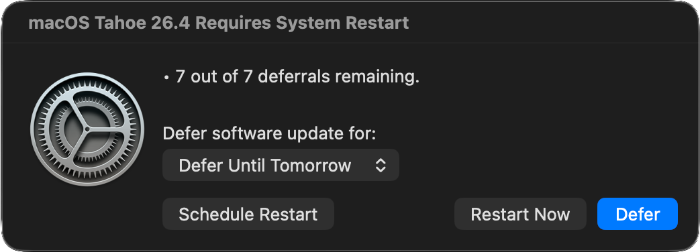
Prior to your device being enrolled in managed updates, you will receive an email with the subject line: "Action Required: Upcoming macOS Updates for LMU-Managed Macs." The email will let you know what date you can expect your computer to start receiving required update notifications.
You may defer the update up to seven times. After the final deferment, your computer will automatically begin the installation process. Before installation starts, you will receive a 15-minute countdown notification to save your work and close any open documents.
During installation, your computer will restart and be unavailable for about 15-30 minutes. ITS encourages all users to complete the update as soon as possible to help keep your device secure and minimize disruption. Make sure to save your work and close open documents before starting the update.
Jamf Connect and Self Service+ Software Portal
Apple is updating how authentication and security work on macOS devices. As part of these changes, traditional login methods are being phased out.
To ensure LMU devices remain secure and aligned with university security requirements, we are introducing Jamf Connect and the Self Service+ software portal for Mac users.
What’s Happening Now

- You may notice a new icon in your menu bar called Jamf Self Service+.
- This app gives you quick access to approved software, helpful resources, and support tools in one place. It also quietly prepares your device for future improvements to the Mac login experience at LMU.
- The app runs in the background, will not interfere with your work, and can safely be ignored day to day unless you need it.
- If you do not see the icon in your menu bar, you can still access the Self Service+ software portal by clicking the button below to quickly and easily install LMU-licensed software.
What’s Coming Next: Jamf Connect
Over time, LMU will implement Jamf Connect, which modernizes how you sign in to your Mac.
This means:
- Enhanced protection for university accounts and data
- A more streamlined login experience
- Better alignment with LMU cloud services
- Improved password synchronization
You will continue using your LMU credentials. The login screen may look slightly different, but your username and password will remain the same.
How We’re Bringing This to Campus
Newly issued Macs will transition first, followed by existing devices in phases. We will communicate well in advance of any change that impacts your login process.
If you have questions or need assistance, please contact the ITS Service Desk or 310-338-7777.
Jamf Connect FAQs
-
All faculty and staff who are using LMU Mac computers are affected. All LMU-issued Mac devices will transition to Jamf Connect over time. Windows devices are not impacted by this change.
-
No.
-
Newly issued Macs will transition first. Existing devices will be updated in phases. ITS will communicate clearly and in advance before any change impacts your login experience.
-
Apple is updating how authentication and security work on macOS devices. As part of these changes, traditional login methods are being phased out.
To ensure LMU devices remain secure and aligned with university security requirements, we are introducing Jamf Connect for Mac users.
-
You may. Notifications have been largely turned off; however, some users may receive an initial message.
If you receive a notification and are unsure what it means or how to respond, please contact the ITS Service Desk for assistance.